Learn Selenium and Java for Selenium

Sunday, 10 June 2018

GIT in Practical World


GIT in Practical World

We have discussed about meaning of different GIT commands. Now biggest challenge is how exactly GIT is being used in our projects. What kind of GIT approaches are getting followed in organization?


Git approach 1-Using Fork
Let’s take scenario, there are three members in a team as A, B, C. Their project (Demo_GIT) is in central main repository. All three are working on same file ex. XYZ.java

Each team member will create fork of the central main repository. Forking is nothing but taking copy of the repository.

For example, ‘A’ will create fork as Demo_GIT_A.
Then they can take clone of fork into their local and they can start working on their assigned task.
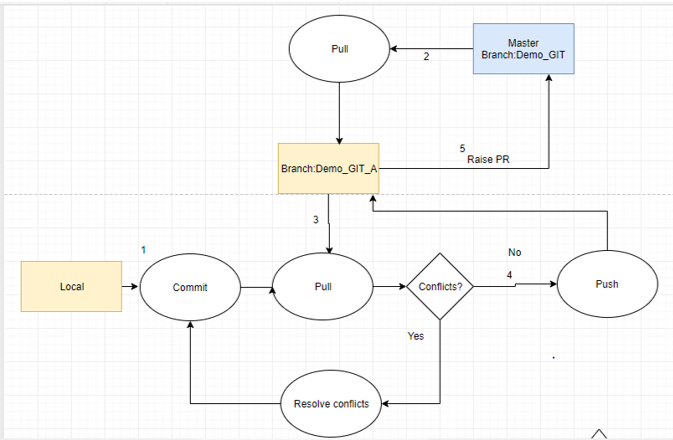
After they done with their work.  They will commit it and take pull from Demo_GIT(main repository).

After resolving conflict, they will push their code to respective Fork.

Now they will raise Pull Request from fork Demo_GIT_A ->Demo_GIT. Here reviewer can review the changes. If everything is fine. Reviewer will merge the code.


Git approach 1-Using Branches

Let’s take same scenario as above, Demo_GIT project is on master branch, all team members will create individual branches.

For example, ‘A’ will create branch as Demo_GIT_A in the same repository.
Then they can take clone of branch into their local and they can start working on their assigned task.

After they done with their work. Its team member’s responsibility to keep their branch updated. So, they will commit it and will take updates from master branch to their individual branch(Demo_GIT->Demo_GIT_A). Now they will take Pull from Demo_GIT_A.
 After resolving conflict, they will push their code to respective Fork.

Now they will raise Pull Request from branch Demo_GIT_A ->Demo_GIT. Here reviewer can review the changes. If everything is fine. Reviewer will merge the code.


GIT Introduction


GIT Introduction

Any automation testing project, we need to develop around 100 + testcases in the limited span of time. It is impossible if you work alone. So here we need to work in team while developing scripts.
GIT makes our life easy while working in team. How?


Using GIT, we can one maintain one central repository where we will have all the test scripts. Suppose three people working on those test scripts. They will also have their own copy of central repository. So, we can say GIT is safer than SVN because we will be having multiple backup copies of project.
Now there are different way to implement the GIT.Ex:
TortoiseGIT, Sourcetree, GIT bash.
Please refer below diagram understand git commands(only).


Note: In diagram commands are not with complete syntax.
Understanding git commands, it’s not enough. While working in a team we need to follow different approaches to use this command. Next blog we will be discussing the git approaches for implementation in our project.


Strings in Java : Part 5

String Methods

Continuing with commonly used method in the stings we are covering here charAt()  method is more detailed manner.


  • String charAt()
    • The charAt() method returns the character at the specified index number. The default index in which a string start is zero.

public class Main{  
public static void main(String args[]){  

String s="Learn Selenium";  

   char character=s.charAt(4);// Returns the char value at the 4th index  

      System.out.println(character);  
 }
}  

The output of the above program is n

Now what if you try to put the index value which is out of range and does not return any string value


public class Main{  
public static void main(String args[]){  

String s="Learn Selenium";  

   char character=s.charAt(15);// Returns Exception

      System.out.println(character);  
 }
}  

The output of the above program is below exception [PS: you have to be very careful while supplying the index no ]

Exception in thread "main" java.lang.StringIndexOutOfBoundsException: String index out of range: 15
at java.lang.String.charAt(String.java:658)
at Main.main(Main.java:4)


Strings in Java : Part 4

String Methods

As we know that string class has variety of methods for String manipulation. We would be explaining the mostly used methods available in string class in detailed manner.

  • String length()
    • The length()  method returns the number of characters available in the string.
 Considering the following program

public class Main {
  public static void main(String[] args) {
    
    String str = "Hello World";
    
    int len = str.length();
System.out.println("The string length of '"+str+"' is: "+len);
    
 }
}

The output of the program would be 11 .


Have you noted the above length() function did calculated the white space as well now you may have a requirement where you do want the white spaces in your program . How to handle this?

public class Main {
  public static void main(String[] args) {
    
    String str = "Hello World";
    
    int len = str.replace(" ", "").length();  [Here worried about what does replace method do ? Do not be we have explained it below :D]

System.out.println("The string length of  is: "+len);
    
 }
}

The output of the program would be 10

  • String Replace()
    • The replace method replaces the old character/string with the new set of character or string. The function accepts 2 arguments
      • Replace(old char, new char)
public class Main{  
public static void main(String args[]){  

       String s1="Hello World";  

       String replaceString=s1.replace("Hello ","Happy");//replaces all occurrences of "Hello" to "Happy"  

       System.out.println(replaceString);  
 }
}  

The output of the program would be HappyWorld


Wednesday, 6 June 2018

What is JIRA?


We have been hearing about JIRA a lot these day. Aren’t we? So, let us discuss some key pointers on JIRA today.

JIRA is a project management tool used for issue tracking, bug tracking and project management purposes.

There are projects in JIRA. A project is simply a collection of issues. An issue represents something that needs to be worked on.
Example:

ABC_FirstProjectName/MNL-101 ---à The key uniquely identifies the issue.
An example issue in so and so part of the app --à The summary tells you what the issue is about.

Assignee: Mukta Sharma
The assignee is the person currently working on the issue.

Status: In Progress
The status indicates where the issue currently is in its workflow.

When we hear about Issues, it is not only limited to bugs. It could be anything. It could be any of the following:
Sub-task
Technical Task
Bug
Epic
Improvement
New Feature
Story
Task

You can create a standard project in JIRA and an Agile_Scrum based project as well.  Standard project in JIRA can have all the above listed issues where Agile_Scrum based project can have the following:
Epic
Story
Technical Task
Bug
Improvement

You can customize the issues as per the project requirement. JIRA gives you flexibility to do that.

Please feel free to give your inputs. Thank you for reading!


Tuesday, 5 June 2018

What is Apache POI in Selenium testing?


In an interview, many times, it has been seen that interviewer asks do you know what is Apache POI?

You can explain Apache POI in simple language as below and you are good to go.

In simple words, I would say Apache POI is a set of libraries which we need to download from official Apache org site to deal with Excel files. Or to read or write in Excel files. If you are working on a Maven project, you can add these Apache dependencies to your project(specifically to your POM.xml) file to work with Excel files(.XLS file and .XLSX file). There are some 10 dependencies which you need to add to your project. You can download the Apache POI maven dependency from official Apache site which is https://www.apache.org

Thank you for reading! I hope it will help you.

What is OOPS in JAVA? - Part 2


Hello All,

Today, we will discuss the remaining 2 parts of OOPS concepts which is Abstraction and Encapsulation.

What is Abstraction?

Hiding internal details of something and when we show only the functionality without considering the internal details of a system, is known as Abstraction.

Example: Can you think of something like this? I give you a minute to think over...THINK.
But, if you still do not get any answer, I tell you.

Example of your Mobile Phone or Car or Laptop. You just know how to use it, right but we do not know the internal structure of these.

In Java, we use abstract class and interface to achieve abstraction.

What is Encapsulation?

When we bind data and code together in a single unit, it is called encapsulation.

A very easy example to understand encapsulation is Java class. Your data members are private and you write the code for the functions you use.

You can give the above examples at the time of interview.

Please feel free to give your inputs in the comments section below. I hope, it will help you in understanding Java concepts.


Popular Posts

Recent Posts


Newsletter

Join our newsletter to get secret tips directly in your inbox!


*We Hate Spam!

Powered by Blogger.